
可以用
PowerShell 脚本+Windows 任务计划程序搞定,不用装第三方软件。思路是:写一个 .ps1脚本,从 Bing 接口拉当天 UHD 图 → 存到图片目录 → 调用 user32.dll设桌面;再用任务计划程序每天定时触发执行。
一、PowerShell 脚本
建议放到如下目录:C:\Scripts\BingWallpaper.ps1
1 | Bing 每日壁纸 → 桌面(UHD) |
逻辑:调 Bing HPImageArchive接口拿当天图 → 下 UHD 原图 → 写 Pictures\BingWallpapers\YYYYMMDD_标题.jpg→ 用 SystemParametersInfo设桌面。
若 Bing 国内偶尔不通,可把 mkt=zh-CN换成 mkt=en-US,并把 _UHD.jpg改成 $img.url(默认 1920×1080)。
二、允许脚本执行
用管理员PowerShell 执行:
1 | Set-ExecutionPolicy -ExecutionPolicy RemoteSigned -Scope CurrentUser |
作用:允许当前用户运行本地 PowerShell 脚本(.ps1)
先手动测一把,确保壁纸能换:
1 | powershell -ExecutionPolicy Bypass -File "C:\Scripts\BingWallpaper.ps1" |
三、任务计划程序
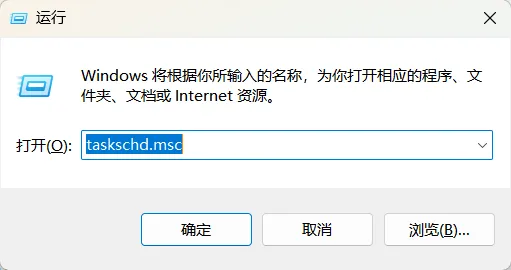
1、Win + R→ taskschd.msc回车
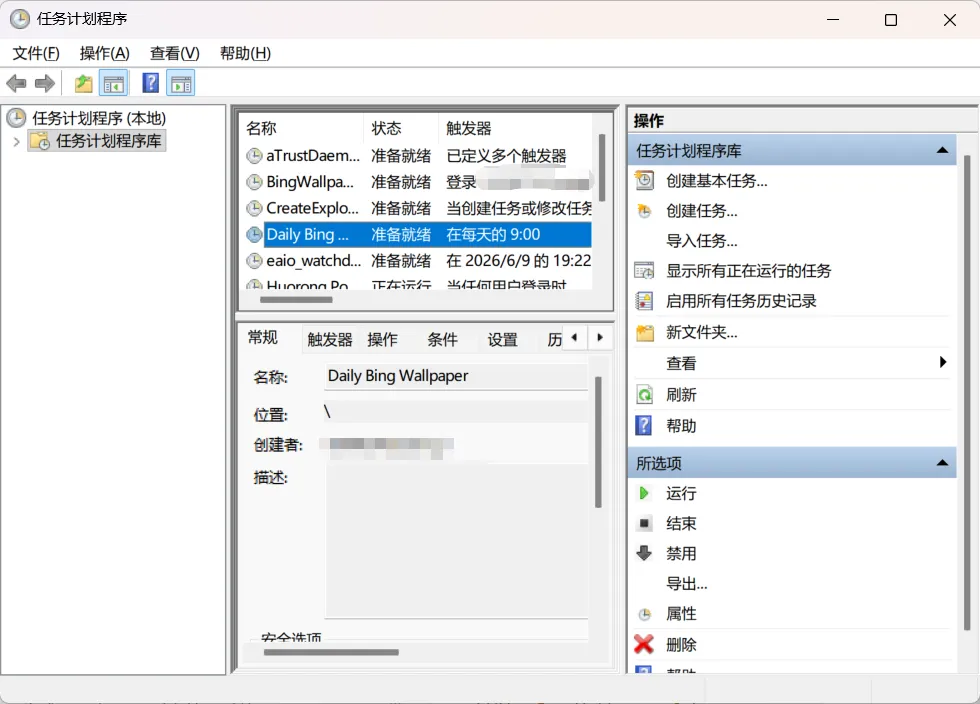
2、右侧【创建基本任务】
- 名称:Daily Bing Wallpaper
- 触发器:每天 → 时间 07:00:00
- 操作:启动程序
程序/脚本:- 程序/脚本:
powershell.exe - 添加参数:
-WindowStyle Hidden -ExecutionPolicy Bypass -File "C:\Scripts\BingWallpaper.ps1"
- 程序/脚本:
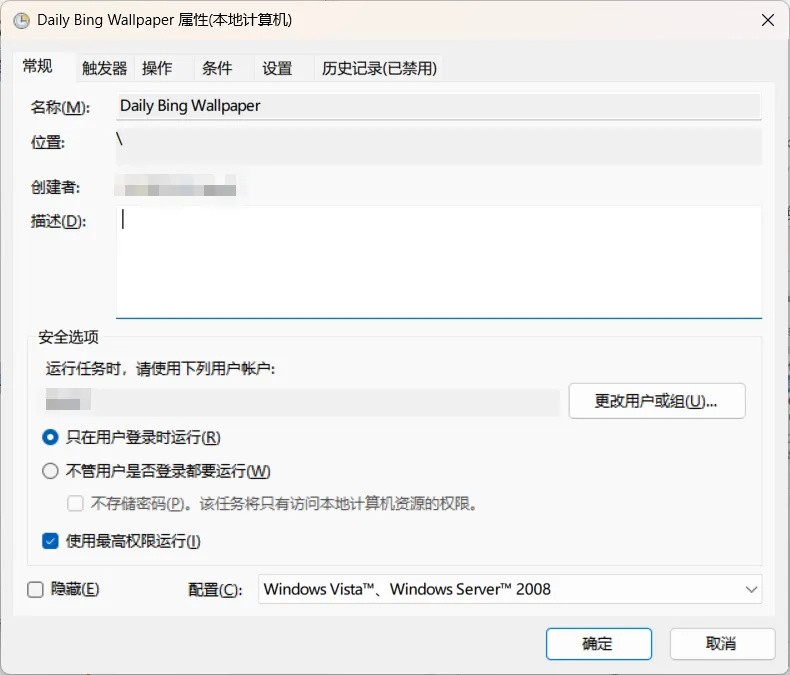
3、完成 → 在“任务计划程序库”双击该任务
- 常规 → 勾选 “使用最高权限运行”
- 条件 → 取消 “只有在计算机使用交流电供电时才启动”(若用笔记本)
4、右键 → 运行 测试一次,看桌面是否切换。
四、任务计划程序「登录时」触发
1、脚本不用改,还是C:\Scripts\BingWallpaper.ps1
2、新建「登录时」任务
- Win + R→ taskschd.msc
- 右侧 创建基本任务
- 名称:
BingWallpaper-OnLogon - 触发器:当用户登录时
- 程序/脚本:powershell.exe
- 添加参数:
-WindowStyle Hidden -ExecutionPolicy Bypass -File "C:\Scripts\BingWallpaper.ps1" - 完成
3、关键设置(一定要做)
在任务计划程序库中找到刚建的任务 → 右键 → 属性:
| 选项卡 | 设置 |
|---|---|
| 常规 | ✅ 使用最高权限运行 |
| 常规 | 配置为:Windows 10 / 11 |
| 触发器 | 编辑 → ✅ 延迟任务 30 秒(建议) |
| 条件 | ❌ 取消“只有在交流电源下才启动” |
| 设置 | ✅ 如果任务已在运行,则不启动新实例 |
💡 为什么延迟 30 秒?
登录瞬间桌面还没完全加载,稍等一下设壁纸成功率更高。
4、测试
- 右键任务 → 运行
- 或 注销 → 重新登录
五、注意点
- 必须 用户已登录 + 有桌面会话(壁纸 API 对当前 session 生效);不选“不管是否登录都运行”更稳。
- 若公司有代理,需在脚本里加 -Proxy或给 WinHTTP 配代理。
- 想留历史壁纸:脚本已按日期存文件;想单张覆盖可固定文件名如
bing_today.jpg。
20260712优化
没网的不进行替换,否则会黑屏
1
2
3
4
5
6
7
8
9
10
11
12
13
14
15
16
17
18
19
20
21
22
23
24
25
26
27
28
29
30
31
32
33
34
35
36
37
38
39
40
41
42
43
44
45
46
47
48
49
50
51
52 # Bing 每日壁纸 → 桌面(UHD,无网不换,有网必换)
$SaveDir = Join-Path $env:USERPROFILE "Pictures\BingWallpapers"
$ApiUrl = "https://www.bing.com/HPImageArchive.aspx?format=js&idx=0&n=1&mkt=zh-CN"
# 1. 网络探测(用 GET + 短超时,比 HEAD 稳)
$hasNetwork = $false
try {
$test = Invoke-WebRequest -Uri "https://www.bing.com" -Method Get -TimeoutSec 5 -UseBasicParsing
if ($test.StatusCode -eq 200) { $hasNetwork = $true }
} catch { $hasNetwork = $false }
if (-not $hasNetwork) { exit 0 }
# 2. 目录
if (-not (Test-Path $SaveDir)) {
New-Item -ItemType Directory -Path $SaveDir -Force | Out-Null
}
# 3. 拉 API
try {
$json = Invoke-RestMethod -Uri $ApiUrl
$img = $json.images[0]
} catch { exit 0 }
$imgUrl = "https://www.bing.com" + $img.urlbase + "_UHD.jpg"
$date = $img.startdate
$title = ($img.title -replace '[\/:*?"<>|]','_')
$outFile = Join-Path $SaveDir "$date`_$title.jpg"
# 4. 不存在才下载
if (-not (Test-Path $outFile)) {
try {
Invoke-WebRequest -Uri $imgUrl -OutFile $outFile -UseBasicParsing
} catch { exit 0 }
}
# 5. 文件存在才设置(用绝对路径,最稳的 SPI 调用)
if (Test-Path $outFile) {
$absPath = (Resolve-Path $outFile).Path
Add-Type -TypeDefinition @"
using System;
using System.Runtime.InteropServices;
public class WinWallpaper {
[DllImport("user32.dll", CharSet = CharSet.Auto)]
public static extern int SystemParametersInfo(int uAction, int uParam, string lpvParam, int fuWinIni);
}
"@
# SPI_SETDESKWALLPAPER = 20, SPIF_UPDATEINIFILE | SPIF_SENDWININICHANGE = 3
[WinWallpaper]::SystemParametersInfo(20, 0, $absPath, 3)
}